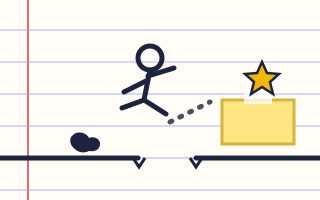
Margin Dash is an endless running game set on a page of a school notebook. A little ink stick figure runs along the ruled lines by itself, and all you do is jump. The page scrolls faster the further you go, ink blots and eraser crumbs get in the way, and gaps open up in the line. The twist is the pencil: pick one up and you can draw a short bridge or ramp yourself.
How to play Margin Dash
- Press Space or tap the page to set off. Your runner keeps running by itself.
- Tap to jump. Hold a little longer to jump higher and further.
- Tap again while in the air for a small double jump, which is often what gets you across a wide gap.
- Run as far as you can. Your distance is your score, and stars along the way add to the run.
What is on the page
- Ink blots, eraser crumbs, flat paper clips and doodled spikes stop your run. Jump over them.
- Gaps in the ruled line mean a fall. Jump them, or draw across them.
- Sticky notes are platforms, and pencil-drawn ramps carry you up onto them.
- A red margin line works as a spring and bounces you up into the air.
- Stars count towards your run, and a pencil gives you one more stroke to draw with.
Drawing with the pencil
Once in a while you find a pencil lying on the line. Each one gives you a short stroke, and you can hold up to three. Drag across the page to draw it: a flat line makes a bridge over a gap, and a sloped one makes a ramp. The page slows for a moment while you draw, and the stroke fades away once it has been used. On a computer, you can also press D or use the Draw bridge button to lay a straight bridge across the next gap. Strokes are limited, and every gap can be cleared without one, so spend them when you really need to.
Game modes
- Classic: one run, as far as you can go. Hit an obstacle or fall through a gap and the run is over.
- Practice: slower, and a fall only puts you back a few metres. End the run whenever you like from the More menu.
- Daily page: one page a day, the same for every player, with a finish line 450 metres along. Crashes put you back a little and the clock keeps running, so the best runs are the cleanest ones.
Controls
- On a computer, Space, the Up arrow or W jumps, and holding it jumps higher. Pressing again in the air is the double jump.
- On a phone or tablet, tap anywhere on the page to jump, and hold for a higher jump. Drag across the page to draw with your pencil.
- Press D, or use the Draw bridge button, to lay a straight bridge across the next gap.
- P or Escape pauses on a computer, and the Pause button does the same on a phone. The game pauses by itself when you switch tabs and carries on from the same spot if you reload the page.
Tips for a longer run
- Jump a little before the edge rather than at the last moment. There is a small grace period if you are a touch late, and a press just before you land still counts.
- Hold only as long as you need. A short hop over a low blot gets you back on the line sooner, ready for the next one.
- Save the double jump for when you need the extra distance, not the first jump you make.
- Keep your pencil strokes for the wide gaps later on, when the page is moving fast.
Frequently asked questions
- Is this running game free?
- Yes. Margin Dash is free to play in your browser, with no download and no account.
- Does it work on a phone?
- Yes. Tap to jump and drag to draw. It works in portrait and on its side.
- How do I draw a bridge?
- Pick up a pencil, then drag across the page in front of your runner. On a computer you can also press D to lay a straight bridge across the next gap.
- Can every gap be cleared?
- Yes. Every stretch of the page can be cleared with an ordinary jump or double jump, without using your pencil. The pencil is there as a choice.
- What does the Daily page do?
- Every day there is one new page, the same for everyone, with a finish line. Your finishing time and your streak of days stay in this browser.
- Will I lose my run if I close the page?
- No. Your run and best distances are kept in this browser. When you come back the game is paused where you left it.